2000
During 2000, IFS significantly increased its R&D efforts to produce IFS Applications 2001. Foundation1 was no exception and a number of major improvements were made. The Windows client was modernized to Office 2000 look-n-feel. IFS Connect got new adaptors for OPC (OLE for Process Control), WAP phones, barcode readers, IBM Mobile Connect (Handheld solutions), and more.
The average size of IFS customers had grown significantly making multi-site installations more the rule than the exception. To make such installations easier, new functionality for configurable replication of any business object was added.
The Web Kit continued to be developed. For a while, the Web Kit team had been looking at different types of web portals that were becoming so frequent on the web. Ideas of a user interface based on a portal metaphor rather than Windows applications had been growing. The serious work began early in the year, leading to IFS' 3rd generation web interfaces with the IFS Personal Portal as a unifying personalized view into IFS Applications and other information sources alike. The look-n-feel and behavior of the web interface had changed completely. The difference was amazing, and the new interface was so much easier to use.
The Web Kit was also separated from the IFS Foundation1 component and released on its own. Similarly, IFS Connect was split into two components with a separate component containing the adapters. The Foundation1 platform now consisted of IFS Foundation1 3.0, IFS Web Kit 3.0, IFS Connect, and IFS Connect Adapters.
IFS Applications 2001, launched at the end of the year, included over 200 portlets for the personal portal, B2B and B2E web solutions for nearly all components of IFS Applications.
The Ti22 project, started at the end of 1999, continued.
A CORBA middleware had now been chosen and frameworks for server and web development were being built. The implementation architecture chosen was completely service oriented, with native support for XML in all areas. Because of the death of dot coms, the focus of the project shifted from B2C web sites towards B2B web, business process and application integration.
At the end of the year the decision was made to move IFS Connect and IFS Web Kit onto the new middleware. Since almost all the code in IFS Connect and IFS Web Kit is Java, this was not an overwhelming task.
2007年10月14日 星期日
History of IFS Foundation1 (1998-1999)
1998
At the beginning of the year, focus turned to usability, easy data retrieval, and ad hoc reporting. Features such as quick reports and single-click export to Excel were introduced. Support for handling EDI messages was added. A lot of work was also put into fixing bugs, memory leaks, and just making the whole environment more stable. This led to version 2.1 of Foundation1 on which IFS Applications 99 was released in the fall. IFS Applications 99 had a lot of new functionality and became a huge success. There is still a decent customer install base for IFS Applications 99.
The Web Kit continued to be developed and was integrated into the life cycle support tools of Foundation1. Web interfaces were released for selected components of IFS Applications 99 towards the end of the year. Most popular with customers were the web interfaces for time & attendance and work order handling.
In the area of general trends, business applications started to become more and more integrated. There was integration with other applications, new types of clients, and various devices such as mobile telephones, bar code readers, and radio terminals. To stem an emerging flood of custom-made solutions in IFS Applications, a project to develop an extensible integration framework was started. The framework should use XML as the native data format and have pluggable adaptors for other protocols and standards. Just as for the Web Kit, the implementation was done in Java and executed as COM objects under MS Windows and MTS.
1999
The integration framework started the previous year was completed and released as IFS Connect. IFS Connect was released as a separate component. The Foundation1 platform now consisted of two components: IFS Foundation1, containing the client-server development environment and life cycle support, and IFS Connect which was the integration framework.
Experiences from the first customer installations of web user interfaces resulted in a major overhaul of the Web Kit internal structure and the HTML output created. This work led to the second generation of IFS web interfaces with significant performance improvements and a lot more browser-side functionality. IFS now started to package two types of web solutions, B2E (Business-to-Employee) and B2B (Business-to-Business). The B2E interface was essentially an alternative full user interface for IFS Applications, while the B2B interface was specifically developed for use by external partners such as customers and suppliers. The Web Kit also started to become used by .com startups to build market places and other solutions with IFS Applications as the back end.
IFS Applications 2000 was released in the fall, again with lots of new functionality and entire new solutions. More and more customers started to make use of the new web interfaces and integration capabilities provided through IFS Connect.
1999 was also the year of .com startups, and IFS got involved with quite a few, particularly in the Nordic market. Another significant change was that ERP applications, including IFS Applications, broadened their scope to cover new areas such as CRM, eBusiness solutions (anything from back end application integration to consumer web shopping). It became clear that in the future IFS would be building application components with more varying characteristics than had been the case. While the architecture used by Foundation1, with business logic running inside the database server, was (and still is) ideal for database-intensive applications, new capabilities would be needed by some of the new components in future versions of IFS Applications. Promoting a freedom of choice strategy, IFS also wasn't satisfied that both the Web Kit and the Connect framework relied on Microsoft COM middleware and thus would only run on Windows.
To meet future requirements, the Foundation1 group started project Ti22 at the end of the year. The mission of the project was to identify a platform-independent middleware, an implementation architecture for high-performance application servers, and new innovative technologies for building high-end B2C web solutions.
At the beginning of the year, focus turned to usability, easy data retrieval, and ad hoc reporting. Features such as quick reports and single-click export to Excel were introduced. Support for handling EDI messages was added. A lot of work was also put into fixing bugs, memory leaks, and just making the whole environment more stable. This led to version 2.1 of Foundation1 on which IFS Applications 99 was released in the fall. IFS Applications 99 had a lot of new functionality and became a huge success. There is still a decent customer install base for IFS Applications 99.
The Web Kit continued to be developed and was integrated into the life cycle support tools of Foundation1. Web interfaces were released for selected components of IFS Applications 99 towards the end of the year. Most popular with customers were the web interfaces for time & attendance and work order handling.
In the area of general trends, business applications started to become more and more integrated. There was integration with other applications, new types of clients, and various devices such as mobile telephones, bar code readers, and radio terminals. To stem an emerging flood of custom-made solutions in IFS Applications, a project to develop an extensible integration framework was started. The framework should use XML as the native data format and have pluggable adaptors for other protocols and standards. Just as for the Web Kit, the implementation was done in Java and executed as COM objects under MS Windows and MTS.
1999
The integration framework started the previous year was completed and released as IFS Connect. IFS Connect was released as a separate component. The Foundation1 platform now consisted of two components: IFS Foundation1, containing the client-server development environment and life cycle support, and IFS Connect which was the integration framework.
Experiences from the first customer installations of web user interfaces resulted in a major overhaul of the Web Kit internal structure and the HTML output created. This work led to the second generation of IFS web interfaces with significant performance improvements and a lot more browser-side functionality. IFS now started to package two types of web solutions, B2E (Business-to-Employee) and B2B (Business-to-Business). The B2E interface was essentially an alternative full user interface for IFS Applications, while the B2B interface was specifically developed for use by external partners such as customers and suppliers. The Web Kit also started to become used by .com startups to build market places and other solutions with IFS Applications as the back end.
IFS Applications 2000 was released in the fall, again with lots of new functionality and entire new solutions. More and more customers started to make use of the new web interfaces and integration capabilities provided through IFS Connect.
1999 was also the year of .com startups, and IFS got involved with quite a few, particularly in the Nordic market. Another significant change was that ERP applications, including IFS Applications, broadened their scope to cover new areas such as CRM, eBusiness solutions (anything from back end application integration to consumer web shopping). It became clear that in the future IFS would be building application components with more varying characteristics than had been the case. While the architecture used by Foundation1, with business logic running inside the database server, was (and still is) ideal for database-intensive applications, new capabilities would be needed by some of the new components in future versions of IFS Applications. Promoting a freedom of choice strategy, IFS also wasn't satisfied that both the Web Kit and the Connect framework relied on Microsoft COM middleware and thus would only run on Windows.
To meet future requirements, the Foundation1 group started project Ti22 at the end of the year. The mission of the project was to identify a platform-independent middleware, an implementation architecture for high-performance application servers, and new innovative technologies for building high-end B2C web solutions.

History of IFS Foundation1 (1996-1997)
1996
Foundation1 was now a complete application development platform.
Rational Rose had been introduced as the design tool,
and IFS/Design helped transform the Booch object models to implementation code.
The Build and Deploy tools used to create software distributions, install and upgrade, were now fully functional.
Migration of the SYSTEM4 on to the new architecture was in full progress.
IFS Maintenance was the solution that had come the furthest.
This year Sun's Java started to spread its wings. IFS prototyped a graphical Java client using the same business logic as the Windows client - for the first time benefiting from the layered architecture.
Although functional, the prototype demonstrated that big graphical Java programs just didn't run fast enough on the hardware of the time. Instead IFS decided to go with real web clients (just using HTML). The first attempts were made using Oracle web server (OWS).
However, Java lent itself nicely to server development and IFS developed its first Java based product - IFS Event Server. The Event Server allowed business logic to proactively send events and notifications (such as e-mails and SMS messages) to clients and other interested parties.
1997
During the summer,
IFS released its first complete ERP application built entirely on the new Foundation1 platform - IFS Applications 98. This was a major milestone and a number of customer installations were done during 1997 and 1998.
The Foundation1 team was, like many software vendors, busy with the migration of the windows clients and frameworks from Win16 to Win32 platform. This migration was completed in October with the release of Foundation1 2.0. For this version, the Rational Rose tool had also been upgraded and UML was now the notation used for design.
With Java applets struggling to do anything but simple games and animations, server side scripting emerged as a faster and easier way of building "cgi type" applications that only relied on standard HTML in the browser. IFS found the combination of Microsoft Active Server Pages (ASP) and FrontPage to be a very productive environment for server pages. To make development of server pages easier, a framework of server-side components for business logic access, page formatting etc. was to be developed. Trying to avoid technology lock-in, the decision was made to implement these components in Java rather than a Microsoft-specific technology such as Visual Basic. Doing this, IFS was among the first companies to make use of the Microsoft Java SDK with its Java <-> COM interoperability capabilities. The Microsoft Transaction Service (MTS) was used to provide scalability.
The results of these efforts were packaged as an "add-on to Foundation1 for development of web user interface using Microsoft ASP and MTS". This package was dubbed the Web Kit - a name that should live for many years to come. Some prototype web solutions were developed for IFS Applications 98.
Foundation1 was now a complete application development platform.
Rational Rose had been introduced as the design tool,
and IFS/Design helped transform the Booch object models to implementation code.
The Build and Deploy tools used to create software distributions, install and upgrade, were now fully functional.
Migration of the SYSTEM4 on to the new architecture was in full progress.
IFS Maintenance was the solution that had come the furthest.
This year Sun's Java started to spread its wings. IFS prototyped a graphical Java client using the same business logic as the Windows client - for the first time benefiting from the layered architecture.
Although functional, the prototype demonstrated that big graphical Java programs just didn't run fast enough on the hardware of the time. Instead IFS decided to go with real web clients (just using HTML). The first attempts were made using Oracle web server (OWS).
However, Java lent itself nicely to server development and IFS developed its first Java based product - IFS Event Server. The Event Server allowed business logic to proactively send events and notifications (such as e-mails and SMS messages) to clients and other interested parties.
1997
During the summer,
IFS released its first complete ERP application built entirely on the new Foundation1 platform - IFS Applications 98. This was a major milestone and a number of customer installations were done during 1997 and 1998.
The Foundation1 team was, like many software vendors, busy with the migration of the windows clients and frameworks from Win16 to Win32 platform. This migration was completed in October with the release of Foundation1 2.0. For this version, the Rational Rose tool had also been upgraded and UML was now the notation used for design.
With Java applets struggling to do anything but simple games and animations, server side scripting emerged as a faster and easier way of building "cgi type" applications that only relied on standard HTML in the browser. IFS found the combination of Microsoft Active Server Pages (ASP) and FrontPage to be a very productive environment for server pages. To make development of server pages easier, a framework of server-side components for business logic access, page formatting etc. was to be developed. Trying to avoid technology lock-in, the decision was made to implement these components in Java rather than a Microsoft-specific technology such as Visual Basic. Doing this, IFS was among the first companies to make use of the Microsoft Java SDK with its Java <-> COM interoperability capabilities. The Microsoft Transaction Service (MTS) was used to provide scalability.
The results of these efforts were packaged as an "add-on to Foundation1 for development of web user interface using Microsoft ASP and MTS". This package was dubbed the Web Kit - a name that should live for many years to come. Some prototype web solutions were developed for IFS Applications 98.
History of IFS Foundation1 (1994-1995)
1994
To define the "new" architecture and technology of IFS Applications, IFS R&D presented project Everest. The name Everest implied to set high goals and take a steep climb to "be on top".
The overreaching goals of project Everest were to:
- Perform BPR on the software development process used at IFS
- Become the most efficient software producer
- Development and assembly of application components
- A product that can follow the customers business development, as well as technology development
- Avoiding BIG-BANG
More specific goals included providing a graphical (Windows) user interface, a productive development environment, component thinking, use of object oriented design, and co-existence with SYSTEM4..
1995
This was the year when the core principles of the new architecture were established.
The architecture was to be 3-tier with business logic and data storage tiers running in Oracle, and the presentation tier built using Gupta SQL*Windows.
This architecture was dubbed Open Layered Architecture (OLA).
The applications were designed according to object orientation principles with business objects such as Customer, Supplier, Order, Invoice and so on.
Each business object had an implementation in all three layers of OLA.
The collection of these implementation was referred to as the Logical Unit (LU). Logical units communicated internally using private API:s and externally in the business logic tier using public API:s.
At the end of the year, Foundation1 consisted of a number of PLSQL system services to support implementation of business logic and a class library for Gupta SQL Windows. There was also the beginnings of life cycle support with some basic code generation and a first version of IFS/Localization tool.
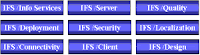
The scope and functionality of Foundation1, which had now reached version 1.1,
was described using the nine components shown on the right.

Development of an IAL Object(Samples)
Development of an IAL-Object consists of the following steps.
- Decide which data is required from the application
- Create an .ial-file that defines this object
- Deploy the object using Sql File Executor.
- Set security using Security-tool, making it available to the end user
This is how an .ial-file may look. Example taken from Foundation1 Demo application
-----------------------------------------------------------------------------
-- Component:
-- Purpose:
-- IFS/Design Template
-- Date Sign History
-- ------ ---- -----------------------------------------------------------
--
-----------------------------------------------------------------------------
define OBJECT = CUSTOMERS
define MODULE = INVADER
define AO = &AO
-----------------------------------------------------------------------------
------------------------ OBJECT REGISTRATION -------------------------
-----------------------------------------------------------------------------
-- Disable to be able to redeploy objects
begin
&AO..IAL_Object_API.Disable('&OBJECT');
end;
/
-----------------------------------------------------------------------------
------------------ VIEW FOR SELECTS ------------------------------------
-----------------------------------------------------------------------------
PROMPT Creating &OBJECT view
CREATE OR REPLACE VIEW &OBJECT._IAL AS
SELECT co.company_id Company,
co.name Company_Name,
cu.customer_id Customer_No,
cu.name Name,
cu.address Address,
cu.city City,
cu.phone Phone_No,
cu.type Type,
cu.total_order_value Tot_Order_Value,
cu.invoice_value Tot_Invoice_Value
FROM &AO..DEMO_COMPANY CO, &AO..DEMO_CUSTOMER CU
WHERE CU.COMPANY_ID = CO.COMPANY_ID
WITH read only;
GRANT SELECT ON &OBJECT._IAL TO &AO WITH GRANT OPTION
/
-----------------------------------------------------------------------------
--------------- TABLE FOR WAREHOUSE ---------------------------------
-----------------------------------------------------------------------------
CREATE TABLE &OBJECT._TAB
TABLESPACE &ial_data STORAGE (&normal)
AS ( SELECT * FROM &OBJECT._IAL WHERE 1=2 )
/
ALTER TABLE &OBJECT._TAB ADD (
CONSTRAINT &OBJECT._PK
PRIMARY KEY (COMPANY, CUSTOMER_NO)
USING INDEX TABLESPACE &ial_index STORAGE (&normal))
/
GRANT SELECT ON &OBJECT._TAB TO &AO
/
-----------------------------------------------------------------------------
--------------- OBJECT REGISTRATION ----------------------------------
-----------------------------------------------------------------------------
begin
&AO..IAL_Object_API.Enable('&OBJECT');
end;
/
2007年10月13日 星期六
How to create a LOV view for ifs portal as a List Value
Step by Step :
- create a new LOV (View as below)
DEFINE MODULE = INVENT
DEFINE LU = InventoryPart
DEFINE VIEW = TP_INVENTORY_PART_LOV
PROMPT Creating report view &VIEW
CREATE OR REPLACE VIEW &VIEW AS
SELECT ip.part_no part_no, ip.description description, accounting_group_api.get_description(ip.accounting_group) acc_group_desc
FROM INVENTORY_PART_TAB ip, user_allowed_site_pub ua, part_catalog_pub pc
WHERE ip.type_code IN ('1', '2', '3', '4', '6')
AND ip.contract = ua.siteAND ip.part_no = pc.part_no
AND pc.position_part = 'NOT POSITION PART'
AND ip.accounting_group = '010'AND ip.contract = '008'
WITH read only;
COMMENT ON TABLE &VIEW IS 'MODULE=&MODULE^LU=&LU^PROMPT=&LU^';
COMMENT ON COLUMN &VIEW..PART_NO IS 'FLAGS=PMI-L^DATATYPE=STRING(25)/UPPERCASE^PROMPT=Part No^';
COMMENT ON COLUMN &VIEW..DESCRIPTION IS 'FLAGS=A-IUL^DATATYPE=STRING(35)^PROMPT=Description^';
COMMENT ON COLUMN &VIEW..ACC_GROUP_DESC IS 'FLAGS=A---L^DATATYPE=STRING(35)/UPPERCASE^PROMPT=Acc Group Desc^'; - to add above LOV in ifs-portal (java source)
...
public void preDefine()
{ ASPManager mgr = getASPManager();
headblk = mgr.newASPBlock("MAIN");
headblk.addField("OBJID"). setHidden();
headblk.addField("OBJVERSION"). setHidden();
....
headblk.addField("PART_NO").
setMandatory(). setInsertable().
setLabel("FCSTYEARPARTPARTNO: Part No"). setSize(25).
setDynamicLOV("TP_INVENTORY_PART_LOV").
setLOVProperty("TITLE",mgr.translate("FCSTYEARPARTPARTNO1: Part No")); - to USE devtool.exe with Scan the sources
to put new LOV in databas efor security setting by Admin.exe - Grant user as below:
GRANT SELECT ON TP_INVENTORY_PART_LOV TO IFSSYS; - re-Run the ifs-portal (http://lg:59080/)
PATH:WebClient Administration folder
--Clear Profile Cache/Clear Security Cache/Reload Configuration file
2007年10月3日 星期三
To Set Client Character Set in windows
--IFS Applications On Windows mode like localize.exe etc
use environment variables through NLS_LANG (Start > Control Panel > System-Advance)
--PLSQL etc tools in windows use environment variables
through the Registry Editor (Start > Run > Regedit).
More examples:
NLS_LANG = AMERICAN_AMERICA.WE8MSWIN1252
NLS_LANG = TRADITIONAL CHINESE_TAIWAN.ZHT16MSWIN950
NLS_LANG = SIMPLIFIED CHINESE_CHINA.ZHS16GBK
NLS_LANG = VIETNAMESE_VIETNAM.VN8MSWIN1258
NLS_LANG = JAPANESE_JAPAN.JA16SJIS
use environment variables through NLS_LANG (Start > Control Panel > System-Advance)
--PLSQL etc tools in windows use environment variables
through the Registry Editor (Start > Run > Regedit).
More examples:
NLS_LANG = AMERICAN_AMERICA.WE8MSWIN1252
NLS_LANG = TRADITIONAL CHINESE_TAIWAN.ZHT16MSWIN950
NLS_LANG = SIMPLIFIED CHINESE_CHINA.ZHS16GBK
NLS_LANG = VIETNAMESE_VIETNAM.VN8MSWIN1258
NLS_LANG = JAPANESE_JAPAN.JA16SJIS
訂閱:
文章 (Atom)